How to Generate and Edit an AI Caption in Postrillo
Give Postrillo’s AI Caption tool a clear brief, edit the result and save a reviewed draft without inventing business claims.
Postrillo how-to series · Guide 22 of 24
AI Caption can help you start a message, but your business remains responsible for what it says. Treat the output as editable material. A useful brief and a careful fact check matter more than accepting the first fluent version.
Before you start
Check current plan access and AI credits before running the tool. Select the intended channel and gather the facts the caption is allowed to use. Exclude private customer details and unsupported prices, testimonials or performance claims from the brief.
1. Provide a clear starting brief
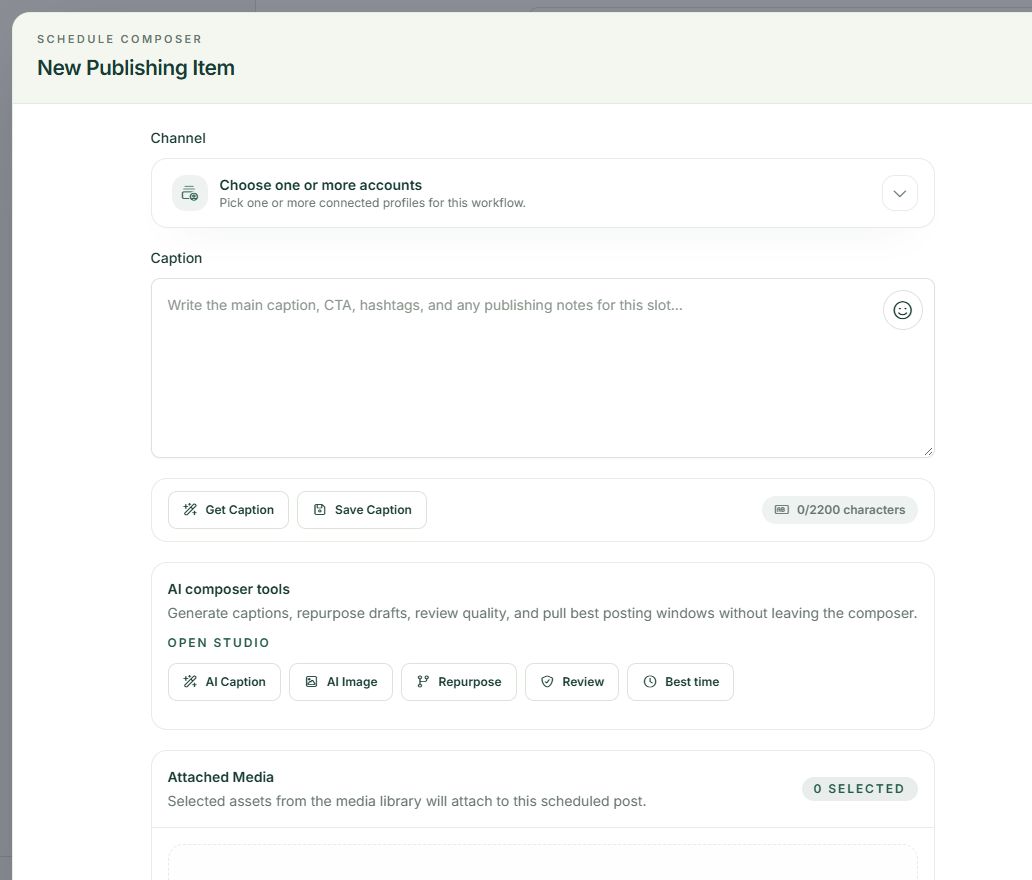
In the publishing composer, enter a short brief in Caption or use relevant internal notes. The AI Caption workflow needs starting content. Include the topic, audience and intended action. Without a useful brief, the tool has less context for a relevant draft.
2. Generate once with a purpose
Choose AI Caption when it is available. The composer uses the selected platform context and can return wording or variants. Wait for the result and read it completely before requesting more. A generated caption has not yet become an approved publication.
3. Edit against real facts
Remove invented examples, guarantees and claims about customers. Correct business names, offer details, links and dates. Make the wording sound like your business rather than preserving every sentence because it was generated. Verify any assertion you cannot confidently support.
4. Save a reviewable item
Check destination and media, then choose Save Draft if more review is needed. If you intend to schedule, review Specific Days & Times separately. Generating text does not confirm that the publishing item was saved, approved or delivered.
A practical example
Illustrative brief: “Write a friendly Facebook caption explaining three things to prepare before a first design consultation. Address small-business owners. Ask readers to save the checklist. Do not invent prices, customer stories or guaranteed outcomes.” Replace the topic with your own verified process.
If something does not look right
If the tool asks for starting content, provide a brief rather than repeatedly pressing the button. If a result is generic, improve the input with accurate context. If access or credits are unavailable, write the caption manually; AI is optional in the first-post workflow.
What to check before moving on
The finished draft should contain only claims you are willing to publish, with a clear purpose and a destination you have checked.
Continue learning: start with the Postrillo getting-started guide or read How to Associate a Post with a Campaign in Postrillo.
Try the workflow: Create your free Postrillo account. Already signed in? Open your dashboard. Check current plan details for available tools and allowances.