A Simple Weekly Social Media Content Calendar for a Small Business
Plan a practical week of social content with a three-post calendar, a worked service-business example and a clear review routine.
A weekly social media content calendar should help you decide what to say, what you need to make and when a post is ready. It does not need to fill every day. For a small business, three useful posts you can prepare and review may be a more manageable starting point than seven unfinished ideas.
Here is a practical three-post example for a service business. The business and situations below are illustrative; use your own services, questions and approved media when you adapt it.
Start with one business priority
Choose a priority that belongs in this week's content. A photographer might want people to understand how to prepare for a portrait session. A salon might need to explain what is included in a consultation. A cleaning service might answer what a customer should do before the team arrives.
Write the priority as a reader's question. “What should I do before my appointment?” gives you a clearer starting point than “post about our business.” Avoid adding an offer just because the calendar has an empty space.
A simple weekly calendar you can copy
| Day | Post and purpose | Media to prepare | Reader's next step |
|---|---|---|---|
| Monday | Answer one preparation question. | Your own photograph of the relevant items or process. | Save the preparation advice. |
| Wednesday | Show how that advice works in a clearly explained example. | A demonstration you have permission to share. | Read the fuller explanation or ask a question. |
| Friday | Explain the next step for someone considering your service. | A suitable service photograph or simple checklist. | Check service details or make an inquiry. |
These days are planning placeholders, not a claim about the best times to post. Choose dates that fit your business, your audience and the time you can give to replies. If three posts are too much to prepare well, start with one.
Make each calendar entry usable
A topic is not a finished instruction. For each post, record the destination account, the main point, a caption draft, the media you need, the link or next action, and the intended date and time. Add a simple status such as idea, needs media, ready for review or scheduled in your working plan.
Here is an illustrative entry for a portrait photographer:
- Main point: bring a second clothing option that fits the agreed session style.
- Caption opening: “Not sure what to pack for your portrait session? Start with the clothing options we discussed when you booked.”
- Media: an original flat-lay photograph of the suggested items.
- Next step: read the photographer's actual preparation instructions.
- Review: confirm that the advice matches that specific service and current booking process.
You can use the same structure for another business without copying the photographer's advice. The example is a way to organize a post, not a universal preparation rule.
Prepare the media before scheduling
Match the image to the point of the post. A useful demonstration or an authentic view of your work can communicate more than a stock image with a long headline. Keep any text overlay short and readable, and put the explanation in the caption.
Check permissions before sharing people, customer work or screenshots. Confirm the destination platform's current media requirements before uploading. A photo that looks right in one preview may need a different crop or format elsewhere.
Move the plan into your publishing workspace
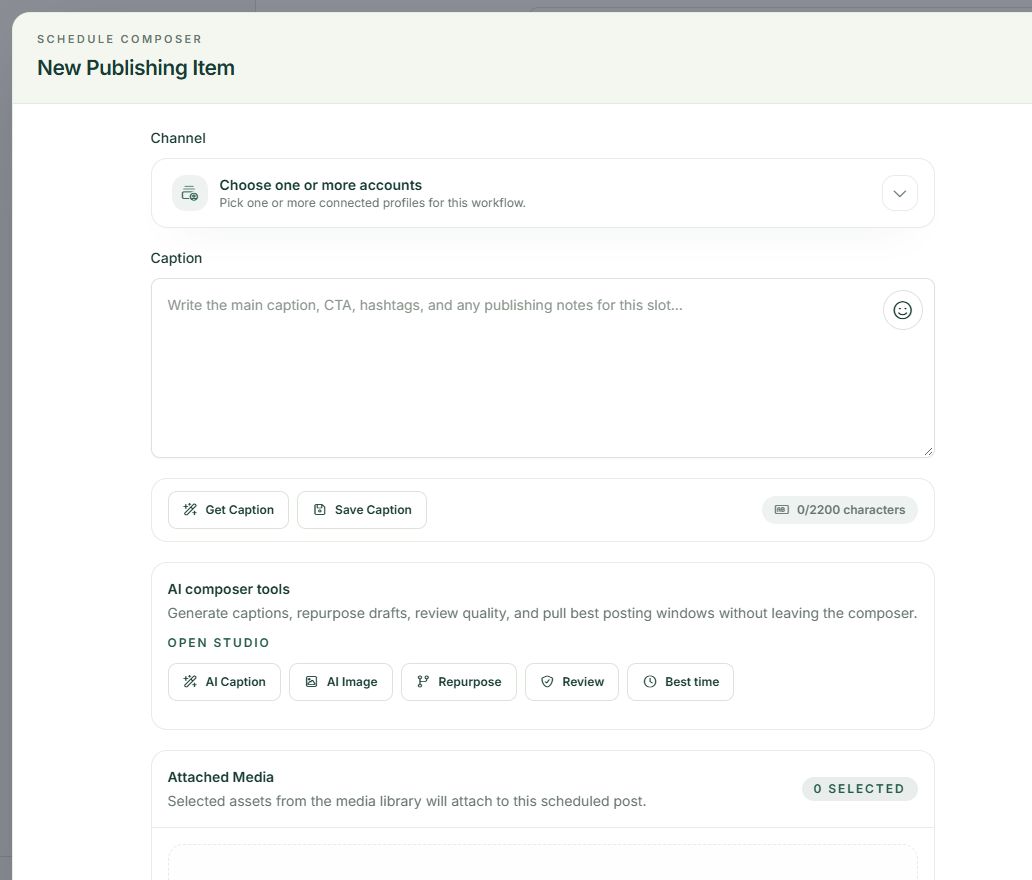
Postrillo's Publishing area includes a calendar and a New Post composer. In the composer, you can choose connected profiles, enter a caption, attach media and choose when to post. To prepare a future publication, use Specific Days & Times rather than the immediate-publishing option. Available channels, tools and limits depend on your plan and the connected account.
Work through one post first. Review the selected destination, media, link and displayed date and time before saving the schedule. Check that the post appears in the calendar or queue, then prepare the next entry. The planner and the publishing queue should tell the same story.
Review what happened before planning the next week
Ask which posts led to relevant questions, service-page visits, inquiries or other useful actions. Note where a reader seemed confused. A scheduled post is not proof that delivery succeeded, so review publishing status as well.
Carry useful questions into next week's plan. You do not need to replace every topic with something new; you need a new angle that adds value. For a structured example, read how to turn one customer question into three posts. Before scheduling, use the five-point publishing checklist.
Your next step: choose one customer question and fill in the three rows above. Then create your free Postrillo account to explore a workspace for your captions, media and publishing plan. Review current plan details for channel availability and limits.