How to Write a Useful Social Caption in Postrillo
Write a focused business caption in Postrillo using one customer question, a useful answer and a clear next step.
Postrillo how-to series · Guide 7 of 24
A useful caption does one job well. It can answer a question, explain a process or help someone make a decision. Start with a real topic from your business, then use Postrillo’s composer to turn it into a reviewable publishing draft.
Before you start
Choose one intended audience and destination. Prepare accurate details and a relevant image if needed. Avoid using a client’s name, photograph or private story without permission. You do not need an AI-generated caption to use the normal composer.
1. Open a new item
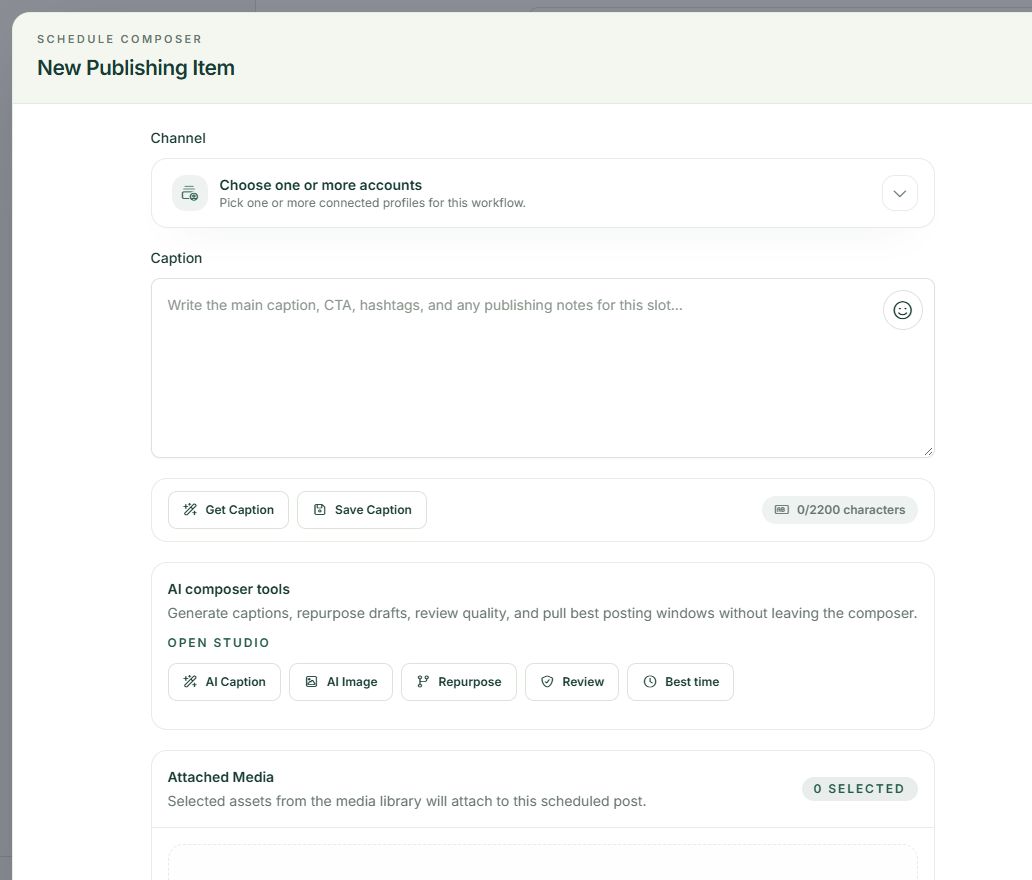
Go to Publishing and choose New Post, or use Create post from the dashboard. Under Channel, select the intended account and read its name. Choosing one destination first makes it easier to judge the tone and content before adapting it elsewhere.
2. Write the answer first
Enter the main message in Caption. Use plain language and put the useful point near the start. A short opening question can work when the rest of the post actually answers it. Avoid padding a practical tip with unsupported claims about guaranteed results.
3. Add one appropriate next step
Ask readers to save a checklist, read a relevant page or take another action that matches the topic. Include a real destination link when needed and check it separately. Do not ask someone to buy, subscribe, comment and share all in the same small post.
4. Read and save your draft
Check spelling, names, dates and the network preview. Look at the displayed character count and any destination validation messages. Choose Save Draft when you want to review later. Saving a caption to a library and saving a draft post are separate actions.
A practical example
Illustrative caption: “Planning a first business website? Decide who it should help, what they need to understand and the next step they should take. Save these three questions before choosing your page layout.” It gives practical advice without inventing a customer result.
If something does not look right
If your caption sounds generic, replace broad encouragement with one detail only your business can explain accurately. If you exceed a limit, remove repetition before removing the useful answer. Do not assume the composer’s overall character counter represents every network’s full formatting requirements.
What to check before moving on
A reader should understand the useful point and the next action without needing to know how the post was created.
Continue learning: start with the Postrillo getting-started guide or read How to Understand AI Credits in Postrillo.
Try the workflow: Create your free Postrillo account. Already signed in? Open your dashboard. Check current plan details for available tools and allowances.